

Color label printing, Color Label Solutions
Why Add a Roll-to-Roll System to Your Epson ColorWorks Printer?
Apr
If you are running an Epson ColorWorks label printer and your label volumes are starting to grow, there comes a point where the printer alone is not the whole conversation.
The bigger question becomes this: How do you run longer jobs, reduce operator involvement, and produce labels in a format that is easier to handle downstream?
That is where a roll-to-roll system starts to make sense.
Roll-to-roll systems are available for several Epson ColorWorks models, including the C4000, C6000A, C6000P, C6500A, C6500P, C7500, and C8000.
What a Roll-to-Roll System Actually Does
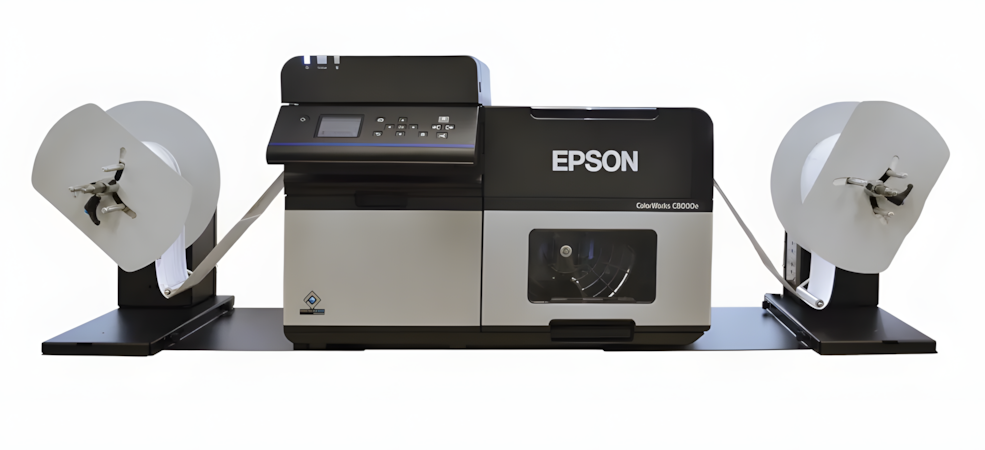
At a practical level, a roll-to-roll system helps your printer operate more like a production tool.
Instead of feeding shorter rolls and dealing with printed labels coming off loosely, the system allows you to load a larger supply roll and rewind the printed labels onto a take-up reel. That gives you a cleaner, more controlled output and supports longer print runs with less interruption.
That may sound simple, but in a real operation, it solves several problems at once.
It helps reduce the number of times an operator needs to stop and manage the printer. It keeps finished labels organized instead of collecting in a messy pile. And it makes it easier to move printed rolls into the next stage of the process.
Why Longer Runs Matter
As print demand increases, small inefficiencies become expensive.
A short run setup might work fine when label demand is low. But once volumes start climbing, the wasted time adds up quickly. Operators change rolls more often. The printer gets interrupted more frequently. Finished labels need more manual handling. Jobs take more attention than they should.
A roll-to-roll system helps reduce that friction by supporting longer unattended runs and improving overall throughput.
That is the real value. It is not just about printing more labels. It is about creating a workflow that requires less babysitting.
Cleaner Output Makes Downstream Handling Easier
This is another area that gets overlooked.
Printing labels is only one part of the job. What happens after printing matters too.
When labels are rewound cleanly onto a finished roll, they are easier to move, store, inspect, or send into downstream equipment. That is especially useful if your process includes applicators, slitters, or offline finishing systems.
That cleaner handoff can save time and reduce unnecessary handling.
In other words, a roll-to-roll system is not just helping the printer. It is helping the workflow around the printer.
When Does It Make Sense to Add One?
Not every Epson ColorWorks user needs a roll-to-roll system.
If you are running shorter jobs, lower volumes, or occasional print batches, your current setup may be good enough.
But it is worth considering when:
- you are changing rolls too often
- operators are spending too much time managing printed output
- you need longer unattended print runs
- your labels need to be rewound neatly for the next step
- your workflow includes application, slitting, or offline finishing
- your print volume is growing and your current process is starting to feel inefficient
That last point matters.
Sometimes businesses think they have outgrown the printer, when what they have really outgrown is the setup around the printer.
A Smarter Upgrade for Growing Operations
For higher-volume users, a roll-to-roll system can be one of the more practical upgrades you can make.
It helps reduce interruptions. It improves label handling. It supports more consistent media movement. And it gives you a better path from printing to finishing.
That is why this kind of system makes the most sense for companies that are trying to get more out of their Epson ColorWorks investment without jumping immediately to a completely different print platform.
If your printer is doing its job but your process still feels too manual, too interrupted, or too dependent on operator involvement, the bottleneck may not be the printer itself.
It may be everything happening around it.
Final Thoughts
A roll-to-roll system is one of those upgrades that becomes more valuable as your operation grows.
It helps you run longer jobs, collect finished labels cleanly, maintain better media control, and produce output that is easier to handle in the next stage of production. Roll-to-roll systems for Epson ColorWorks printers are offered for the C4000, C6000A, C6000P, C6500A, C6500P, C7500, and C8000, making them relevant across a range of label printing environments.
If your current setup is getting the job done but starting to show its limits, adding a roll-to-roll system may be the upgrade that helps your Epson ColorWorks printer function like a more complete production solution.
