
Color Label Printers
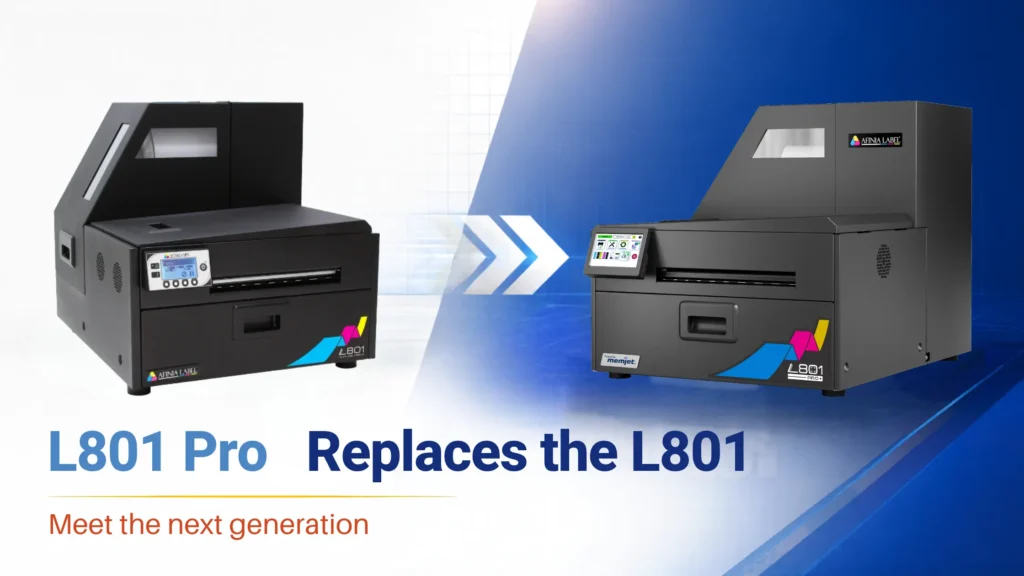
Afinia L801 Pro Replaces the L801 and L801 Plus: What It Means for You
Nov
Afinia Label has replaced its L801 series with the new L801 Pro. If you’re shopping for a color label printer, or you already run an L801 or L801 Plus, here’s what changed and what it means for you.
What changed and what didn’t
The L801 Pro uses the same Memjet print engine as the L801. Print speed (up to 12 inches per second, or 60 feet per minute), resolution (up to 1600 x 1600 dpi), print width (8.5″) and ink capacity (five 250 mL CMYKK cartridges, 1.25 L total) are all the same. Your labels will look the same as they do on an L801.
The changes are in how you run the printer day to day:
- A 5″ touchscreen replaces the small LCD on earlier models. You can check ink levels, run maintenance and walk through printhead replacement right at the printer.
- The printer stores up to 30 recent jobs, with thumbnail previews, so you can reprint them from the touchscreen without going back to the design PC.
- The rollers are easier to reach for routine cleaning.
- It supports Windows 10 and 11 (64-bit) only. ARM/Snapdragon PCs and Macs are not supported.
If you’re buying a new label printer
The L801 Pro is now the model Afinia offers in this class. Afinia rates it for 5,000 to 70,000+ labels per month, which fits businesses printing short to medium runs of product labels in-house, such as food and beverage, supplements, health and beauty, and private label brands. Afinia kept the same starting price as the original L801.
Before you order, check a few things:
- Your computer. You’ll need a 64-bit Windows 10 or 11 PC.
- Your label stock. The printer uses dye-based inks and does not print white, so it works best on white or light inkjet-coated paper or synthetic labels.
- Water resistance. If your labels will be chilled, wet or handled a lot, test your material first.
- Finishing. The built-in cutter is included. The powered rewinder for roll-to-roll production is sold separately.
- Your application. The L801 Pro is not designed for BS5609 GHS drum labels.
If you already own an L801 or L801 Plus
Your printer keeps working, and nothing changes with your current setup.
L801 owners can keep buying the same standard ink cartridges, since the L801 Pro uses the same part numbers (22467 cyan, 22474 magenta, 22460 yellow and 22453 black). L801 Plus owners can continue ordering the Watershield cartridges their printers use.
Should you upgrade? The Pro doesn’t print faster or sharper than your current L801, so if your printer is running well there’s no rush. An upgrade makes sense if:
- Your printer is getting old and you’re planning a replacement anyway.
- Several people run the printer, or you reprint the same labels often. The touchscreen and job recall save time in both cases.
- You’re adding a second printer. If you run a standard L801, it can share the same ink cartridges with an L801 Pro.
Questions about the L801 Pro?
Pacific Barcode is an authorized Afinia Label reseller, and we manufacture inkjet labels in-house. We can help you decide whether the L801 Pro fits your production, match label stock to your application, and send samples so you can see the results before you buy.