
Color Label Printers
Epson ColorWorks C7500 Discontinued: What Replaces It and What to Check Before You Switch
Oct
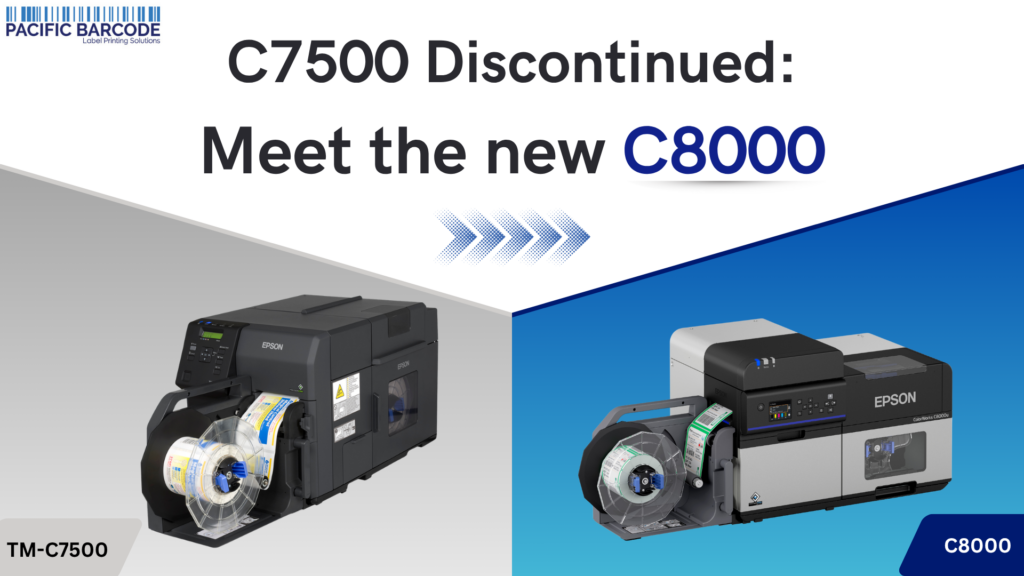
If you’re still running an Epson ColorWorks C7500 or C7500G, Epson has officially discontinued both models and named the ColorWorks C8000 series as the direct replacement. Here’s what actually changed, why it’s worth planning an upgrade now, and what to test before you make the switch.
What happened
Epson’s own product page lists the C7500 as “Discontinued,” with the C7500G showing the same status, about a year after the end-of-sale date. Epson named a direct successor: the ColorWorks C8000 Matte replaces the C7500 Matte, and the ColorWorks C8000 Gloss (sold as the C8000e in some regions) replaces the C7500G. If you need a drop-in replacement, that’s the pairing to use.
What’s different
A few sites selling the C8000 imply it’s a straightforward speed and resolution upgrade over the C7500. The spec sheets don’t back that up, both print at 600 x 1200 dpi and both top out around 11.8″/sec (300 mm/sec). The real differences are in print quality, media handling, and software, not raw throughput:
| C7500 series | C8000 series | |
|---|---|---|
| Resolution | 600 x 1200 dpi | 600 x 1200 dpi (no change) |
| Max print speed | Up to 11.8″/sec | Up to 11.8″/sec (no change) |
| Ink type | DURABrite Ultra (matte) / UltraChrome DL (gloss), split by variant | UltraChrome DL pigment ink across both matte and gloss |
| Ink capacity | Standard cartridges | 480 mL high-yield pouches, about 41% more ink per pouch |
| Connectivity | USB, Ethernet | Adds USB 3.0, Gigabit LAN, optional Wi-Fi |
| Driver support | Windows only | Windows, Mac, and Linux (Ubuntu 22.04, CentOS 7) |
| Print width | 2″ – 4.4″ | 1″ – 4.4″ (handles narrower labels) |
| Max substrate thickness | Up to 0.236 mm | Up to 0.590 mm, with an adjustable head gap for thicker stock |
| Color management | Global lighten/darken only, no ICC profiles, manual spot-color replacement | ICC color profiles, individual CMY plus brightness/contrast/saturation control, in-driver spot-color replacement |
| Remote management | Not available | Epson Cloud Solution PORT for fleet-level ink and status monitoring |
| Maintenance box | SJMB7500 | SJMB7500 (same part, no changeover needed) |
| BS 5609 / GHS certification | Certified with qualified media | Certified with qualified media (carries over) |
The headline change is a redesigned paper transport. Epson describes a new straight-line paper path that eliminates the star-wheel and wind marks the C7500 left on dark, glossy prints, and reduces the static that pulls dust into the print heads. Paired with support for thicker substrates, narrower labels, tag stock, and real ICC-based color management, this is a genuine print-quality and capability upgrade on top of the bigger ink pouches and added connectivity, not just a convenience refresh.
Why upgrade now, not later
Your C7500 will likely keep running for a while. Ink cartridges and label rolls for it are still available. But “discontinued” means Epson has stopped manufacturing it, and that has a few knock-on effects worth planning around rather than reacting to:
- Parts and supplies get harder to find over time. They’re available today. They won’t be indefinitely, and discontinued-model pricing tends to drift upward as remaining stock tightens.
- Epson’s extended service plans are tied to the specific model. If your current plan lapses, you may not be able to renew coverage on a printer Epson no longer sells.
- If a C7500 fails mid-run, you’re choosing a replacement under pressure. Planning the switch now, on your own timeline, beats being forced into it during a production emergency.
- The upgrade itself is low-friction. Same maintenance box, same certification path for GHS/BS 5609 labeling, and the built-in ESC/Label language plus BarTender and ZPL II emulation support all carry over, so your existing label designs and workflow mostly transfer. The C8000 also adds Mac and Linux drivers and direct SAP printing support, including a high-volume plugin for printing GHS labels with color pictograms, useful if your shop runs anything other than Windows.
- The C8000 also handles jobs the C7500 couldn’t. It takes thicker die-cut and tag stock (up to 0.59mm vs 0.236mm), prints narrower labels down to 1″ wide, and adds ICC-based color management with individual CMY, brightness, contrast, and saturation control, useful for anyone matching brand colors precisely.
For anyone printing real volume, the bigger ink pouches and remote fleet monitoring alone tend to pay for the switch in reduced downtime. For exact cartridge part numbers, see our model-by-model ColorWorks ink cartridge guide.
Before you switch: what to test
The C8000 is built to be compatible with existing C7500 workflows, but it’s worth confirming on your own label stock and software before a full cutover. A few things to check before putting a C8000 into production:
- Run a test print of your actual label template before swapping out the C7500 entirely, especially if your labels use die-cut stock with tight margins.
- Check driver settings for your labeling software, particularly anything related to label gap or top-of-form position, since these may behave differently between the two models.
- Keep the C7500 running in parallel until the C8000 is validated on your specific label stock and software setup, rather than a hard cutover.
- Budget for a new rewinder if you use one. Unlike the maintenance box, the C7500’s rewinder (TU-RC7508) isn’t interchangeable with the C8000’s (TU-RC8000).
- If you’re running both models side by side, set the color correction method. Epson recommends the Epson Preferred or Epson Standard setting in the driver to get the closest match between a C8000 and a C7500, though the different ink sets mean colors may not match exactly.
We carry the ColorWorks C8000 Matte and C8000 Gloss printers in stock, along with the ink packs (matte and gloss), maintenance boxes, and label stock to go with them, so you can get everything you need for the switch in one order.
