

Color label printing, Color Label Printers
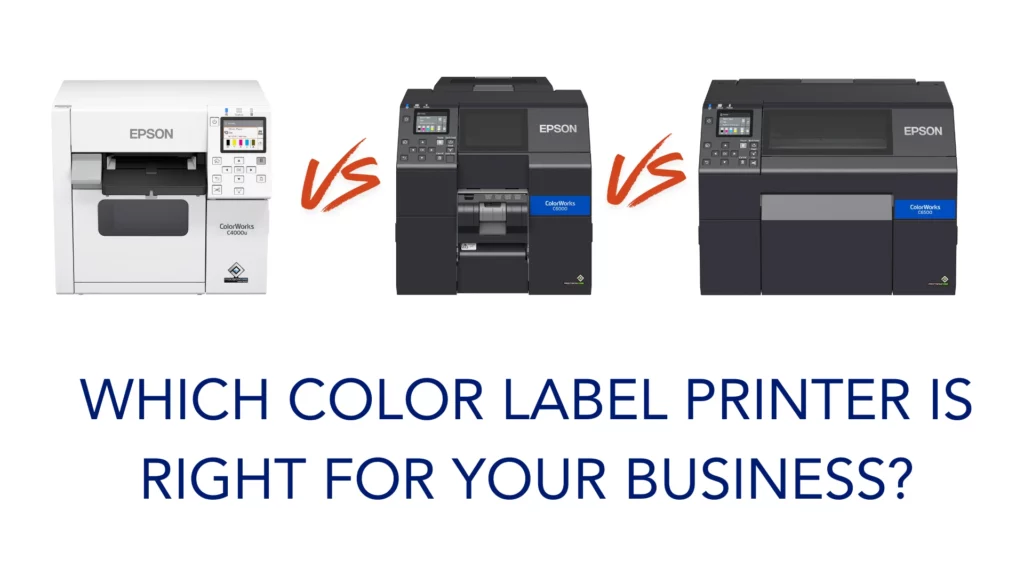
Epson C4000 vs C6000 vs C6500: Which Color Label Printer Is Right for Your Business?
Apr
If you are comparing the Epson C4000 vs C6000 vs C6500, the goal is not to find the printer with the longest feature list.
The goal is to find the one that fits your operation.
All three printers give you the core advantage of on-demand color label printing. That means you can print labels when you need them, reduce pre-printed inventory, respond faster to label changes, and avoid waste from outdated stock.
But these printers are not built for the same environment.
The real differences come down to:
- label width
- print volume
- workflow
Get those three right, and the decision becomes a lot easier.
Epson C4000: Best for Smaller Operations and Moderate Volumes
The Epson C4000 is a strong fit for companies that want to bring color label printing in-house without stepping into a heavier production platform.
It makes the most sense when:
- your labels are 4.25 inches wide or less
- your print volume is low to moderate
- your workspace is limited
- you want a professional color printer that is practical and easy to use
For many companies, the C4000 is the right first move into on-demand color printing. It gives you more flexibility, more control, and better speed when label content changes, without adding more printer than you really need.
If your operation is straightforward and your daily label demand is manageable, the C4000 is often the smart, cost-conscious choice.
Epson C6000: Best for Higher Volume 4-Inch Label Printing
The Epson C6000 is also a 4-inch class printer, but it is built for a more demanding environment.
This is the better choice when:
- your labels are still 4.25 inches wide or less
- your operation is more production-driven
- your print volumes are higher
- you need a more robust, scalable solution
- you are replacing or upgrading a thermal transfer workflow
This is where the C6000 separates itself from the C4000.
It is designed for companies that need more than a solid desktop printer. It is a better fit for production areas, manufacturing environments, and operations that need more throughput and a stronger workflow fit.
If your business depends on label printing every day and the printer needs to keep up, the C6000 is usually the safer long-term decision.
Epson C6500: Best for Wider Labels and Larger Applications
The Epson C6500 solves a different problem.
Its biggest advantage is width.
If your labels need more print area, the C6500 is the right place to look.
That often includes:
- larger product labels (up to 8.34 inches wide)
- chemical labels
- GHS labels
- compliance labels
- larger packaging labels
- logistics labels with more content
This is where companies can get into trouble if they focus too much on upfront cost. Trying to force a wide-label application into a smaller 4-inch printer usually creates problems later, whether in readability, layout, or workflow.
If your application needs wider labels, the C6500 is usually the clear answer.
Do Not Start With Specs. Start With Your Workflow.
A lot of printer comparisons get off track because buyers focus too much on specs and not enough on how the printer will actually be used.
Start with these questions instead:
- What size labels are you printing?
- How many labels are you printing each day?
- Is this for office use, production use, or warehouse use?
- Are you printing labels in batches or one at a time?
- Are you solving a current issue or planning for future growth?
Those are the questions that lead to the right decision.
Because the best printer is not the one with the most features.
It is the one that fits the way your business actually operates.
Auto Cutter vs Peel-and-Present
Another important consideration is workflow.
With the C6000 and C6500, you also need to think about whether your application is better suited for:
- auto cutter
- peel-and-present
That choice matters.
If you are printing labels in batches for later application, an auto cutter model may be the better fit.
If you are printing one label at a time and applying it immediately, peel-and-present may make more sense.
This is one more reason why choosing the right printer should always be tied to the actual process on your floor, not just the printer spec sheet.
Which Epson ColorWorks Printer Should You Choose?
Here is the simplest way to look at it.
Choose the Epson C4000 if you need a compact 4.25-inch color label printer for lower to moderate print volumes and a more straightforward workflow.
Choose the Epson C6000 if your labels are still 4.25 inches or less, but your environment is more demanding and your production volume is higher.
Choose the Epson C6500 if your labels need more width and your application requires a larger print area.
Final Thoughts
The wrong way to buy a color label printer is to focus only on the purchase price.
The right way is to look at the full picture:
- label size
- print volume
- workflow
- long-term fit
That is what keeps you from buying a printer that looks good on paper but creates headaches in the real world.
If you are not sure which Epson ColorWorks printer is right for your application, we can help you evaluate your label size, material, volume, and workflow so you choose the printer that fits your operation, not just your budget.
